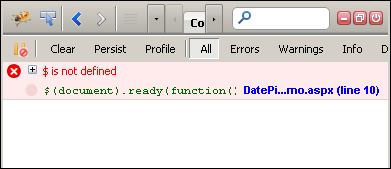
"jQuery is not defined" or "$ is not defined" is a very common error that you may face while working with jQuery or if you have started learning jQuery. The error message "jQuery is not defined" clearly says that it can't find the jQuery and you are trying to access jQuery's power. So in this post, find 5 reasons and their solutions of this error.
Reason 1:
You have forgot to include the reference of jQuery library and trying to access it.
Reason 2:
You have include the reference of the jQuery file, but it is after your jQuery code. For example,
So in this case, you will encounter "jQuery is not defined" error, as the reference of the jQuery library is after the code.
Reason 3:
The order of the scripts is not correct. For example, if you are using any jQuery plugin and you have placed the reference of the plugin js before the jQuery library then you will face this error. For example,
Above code is clear case of incorrect ordering. As when plugin try to access the jQuery and jQuery is not loaded yet then this error will come. So the correct order should be,
Reason 4:
If you are using jQuery UI library then please ensure that order is correct. You first need to include reference of jQuery library and after that jQuery UI library. This is incorrect ordering.
Correct order is:
Reason 5:
If you are loading the jQuery library from any of the CDN (Read Load your jQuery framework from CDN), then please check that CDN link is working. So the best thing is to use code to load jQuery even if the CDN link is down. Read How to load jQuery locally when CDN fails
So there are 3 possible solution for this error.

Reason 1:
You have forgot to include the reference of jQuery library and trying to access it.
Reason 2:
You have include the reference of the jQuery file, but it is after your jQuery code. For example,
1 | <script type="text/javascript" language="javascript"> |
2 | $(document).ready(function() { |
3 | //Your jQuery code goes here.... |
4 | }); |
5 | </script> |
6 |
7 | <script type="text/javascript" src="Script/jquery-1.7.1.min.js"></script> |
Reason 3:
The order of the scripts is not correct. For example, if you are using any jQuery plugin and you have placed the reference of the plugin js before the jQuery library then you will face this error. For example,
1 | <script type="text/javascript" src="Script/jquery-plugin.js"></script> |
2 | <script type="text/javascript" src="Script/jquery-1.7.1.min.js"></script> |
1 | <script type="text/javascript" src="Script/jquery-1.7.1.min.js"></script> |
2 | <script type="text/javascript" src="Script/jquery-plugin.js"></script> |
Reason 4:
If you are using jQuery UI library then please ensure that order is correct. You first need to include reference of jQuery library and after that jQuery UI library. This is incorrect ordering.
1 | <script type="text/javascript" src="Script/jquery-ui-1.8.18.min.js"></script> |
2 | <script type="text/javascript" src="Script/jquery-1.7.1.min.js"></script> |
1 | <script type="text/javascript" src="Script/jquery-1.7.1.min.js"></script> |
2 | <script type="text/javascript" src="Script/jquery-ui-1.8.18.min.js"></script> |
Reason 5:
If you are loading the jQuery library from any of the CDN (Read Load your jQuery framework from CDN), then please check that CDN link is working. So the best thing is to use code to load jQuery even if the CDN link is down. Read How to load jQuery locally when CDN fails
So there are 3 possible solution for this error.
- Please ensure that you have included the reference of jQuery library.
- Please ensure the order of loading jQuery library in case if you are using any other js which is dependent on jQuery library.
- If you are using CDN, then read and implement How to load jQuery locally when CDN fails
Reference :http://jquerybyexample.blogspot.com
-Thanks.
